

VidAI: Revolutionizing Video Content with AI-Powered Personalization


The Beginning: A Gap in the Video Experience
In today’s world, where video consumption is ubiquitous, the platforms that deliver it often fail to offer truly personalized and engaging experiences. As a UX designer, I was tasked with reimagining what video platforms could offer, not just for viewers but also for content creators. This wasn’t just about improving the UI or adding a new feature—it was about transforming how people interacted with video content, making it smarter, more engaging, and more efficient.
I was part of a team working on VidAI, a new AI-powered video platform. Our mission: Create a tool that would go beyond traditional video-sharing experiences and push boundaries with features like hyper-personalized content recommendations, real-time viewer interaction, and AI-assisted editing tools for creators.
But before diving into design, I knew we had to start with the users. And that’s where the journey truly began.
Understanding the Users
The first step was deep user research. I needed to get inside the heads of creators, viewers, and marketers, to uncover what they truly wanted in a video platform.
I conducted 25 in-depth user interviews across different user groups:
Creators, who were frustrated by time-consuming video editing and wanted better insights.
Viewers, who were overwhelmed by the endless scroll of content but never felt like the recommendations were tailored to their needs.
Marketers and educators, who wanted tools that would help them engage viewers during videos and extract valuable feedback.
Through these conversations, I realized something crucial: the traditional, passive video-viewing experience was becoming outdated. People wanted more control, more engagement, and more meaningful interactions. Here’s what I learned from the interviews:
70% of viewers felt that content recommendations didn’t align with their current mood, interests, or needs.
80% of creators wished for tools that could save them time—especially with repetitive tasks like captioning and thumbnails.
60% of marketers craved the ability to interact with viewers in real-time through polls, quizzes, and interactive content.

With these insights, I knew we had to focus on three main goals:
Personalization: Make the platform feel like it was built for each individual user.
Engagement: Empower viewers to interact with videos beyond just liking or commenting.
Creator Efficiency: Provide tools that made video production faster and more insightful.
Persona Infographics: Humanizing VidAI Users

To anchor design decisions in real-world context, we developed visually compelling persona infographics for three key user types — Creator, Viewer, and Marketer — each interacting with the video AI platform in distinct ways.
These profiles synthesize user research into presentation-ready visuals that highlight:These persona infographics helped unify product, design, and engineering teams around user-centric priorities — ensuring that every feature, from auto-captioning to video summarization, was built with empathy and strategic intent.
User Journey Map – "Alex's Journey with VidAI"

Key Takeaways:
Biggest Friction: Traditional platforms lack interactivity and smart creator tools.Biggest Wins: AI automation, engagement features, and data-backed content improvement tools.
Design Focus Areas:Personalized, emotion-aware discoveryReal-time interaction during playbackSeamless creator onboarding and content enhancement
Research Insights:
Quantifying the Pain PointsBefore designing VidAI, we conducted extensive user research—including structured interviews and online surveys—with content creators, casual viewers, and educators. From that research, four key insights emerged, each visualized through custom sketches that guided our UX direction.

Insight: A majority of users found current recommendation systems ineffective.To assess how well existing platforms serve users with personalized content, we asked:
How accurate are the content recommendations you usually receive?”The resulting bar chart tells a clear story:
15% found recommendations accurate and relevant
35% found them somewhat accurate
50% said recommendations were not aligned with their interests
Design Takeaway:This feedback reinforced our decision to build a more intelligent, mood/context-aware recommendation engine into VidAI. We introduced features like time-of-day filtering, emotion-based suggestions, and social activity syncing to solve this disconnect.

Insight: Creators crave automation and performance insights.We asked creators to rank their most-needed tools.
The sketch of this pie chart breaks down their priorities:
Auto-Captioning (35%)
Thumbnail Generator (25%)
Engagement Analytics (20%)
Trend Insights (10%)
Collaboration Tools (10%)
Design Takeaway:These responses directly influenced the AI Creator Dashboard. We prioritized tools that automate repetitive work (captions and thumbnails), and surfaced performance analytics for smarter content iteration.


Insight: Passive viewing is out. Engagement and personalization are in.We wanted to learn what features viewers value most.
The horizontal bar graph visualization highlights the top five:
70% want Personalized Recommendations
60% want Real-Time Interaction
45% want Short Snackable Videos
40% want Mood-Based Filtering
30% want Social Sharing
Design Takeaway: These insights helped us shape the Home Screen and Video Player features. The final designs include live polls, interactive video prompts, and personalized content streams based on mood and behavior.
Insight: Creators lose valuable time to tasks that could be automated.
Our survey asked creators to estimate weekly time spent on routine video prep tasks:
Manual Editing: 5 hrs/week
Captioning: 4 hrs/week
Thumbnail Design: 3.5 hrs/week
Tag Optimization: 2.5 hrs/week
Design Takeaway:This data further justified investment in AI editing tools that streamline content creation. By helping creators reclaim hours each week, VidAI supports faster content cycles and higher-quality production.
Summary: Turning Research Into UX Strategy
These four visualizations served as evidence-based design pillars for VidAI. By quantifying what users struggle with and what they truly want, we ensured that every screen and feature directly addressed real needs—not assumptions.
Crafting the Solution
1. Mapping Research Insights to Features
Now that we understood the problems, it was time to create the solutions.
I began sketching out the key features of the platform. For VidAI to succeed, it had to feel fresh, intuitive, and above all, smart. Here’s how I approached it:
AI-Powered Personalization: I envisioned an intelligent recommendation system that goes beyond what’s traditionally available—one that adapts based on a user’s mood, the time of day, and even social signals (e.g., what’s trending among friends). This would help users discover content that felt relevant and dynamic, not just based on their past watch history.
Real-Time Interaction: To tackle the need for engagement, I designed features like live polls and interactive clickable elements that viewers could participate in while watching videos. The idea was to allow users to become part of the experience, making them feel more connected to the content and the creator.
AI Editing Tools for Creators: I crafted an intuitive creator dashboard that would include tools like auto-captioning, thumbnail generation, and video performance insights. The goal was simple: help creators save time by automating repetitive tasks and give them actionable data to refine their content.


Affinity mapping

2. Sketching Ideas (Low-Fidelity Concepts)
Using quick sketches and whiteboard wireframes, I explored several layouts and flows for the AI-driven recommendation engine and interactive video player. These helped test early hypotheses with internal stakeholders and ensured alignment before diving into high-fidelity design.


3. Ideation Sessions (Individual or Collaborative)
In a design studio workshop, we ran a ‘Crazy 8s’ session to explore multiple concepts for interactive video elements. The strongest ideas revolved around lightweight, unobtrusive engagement overlays like polls and reaction buttons.


4. Prototyping Key Concepts
To validate our assumptions, I created a clickable prototype of the AI-powered home feed and interactive video player. We tested these with 8 users to observe their engagement with real-time polls and their perception of relevance in content suggestions.


user taps a thumbnail
decision points: Skip Video, Open Comments, or Vote in Poll
user selects an option

user reads or adds comments
next recommendations appear
5. Validating and Prioritizing with Feasibility
After initial exploration, we used a Value vs. Complexity matrix to prioritize the AI editing features. Auto-captioning ranked high in both value and feasibility, while advanced editing analytics were scheduled for a future phase.


Bringing the Vision to Life
With the features mapped out, I dove into the wireframing phase. The challenge here was to balance functionality with simplicity. VidAI was designed to be sophisticated under the hood but easy to use for everyone—from professional content creators to everyday viewers.
I started with low-fidelity wireframes, focusing on user flows and basic interactions. I imagined users moving seamlessly between the home screen, video player, and creator dashboard, all the while interacting with dynamic content that felt personalized to them.
Home Screen: A clean layout with personalized content recommendations, categories, and quick access to the interactive video feed.
Video Player: A sleek, minimal interface, allowing real-time polls, questions, and interactive elements without disrupting the viewing experience.
Creator Dashboard: A streamlined set of tools designed to automate and analyze video performance, including an AI-powered thumbnail generator and real-time analytics on video performance.
Once the wireframes were ready, I moved to the high-fidelity design. I refined the visuals: adding color, typography, and micro-interactions to bring the design to life. The goal was to keep everything clean and modern, ensuring that the AI-powered features were subtle but powerful.
1. Low-Fidelity Wireframes


Filter Bar at the top with buttons: Most Liked, Trending, and Recommended
Grid of Video Thumbnails (2 columns × 3 rows) with tags like For Your Mood and Trending above each
Bottom Navigation Bar with icons for Home, Explore, Notifications, and Profile
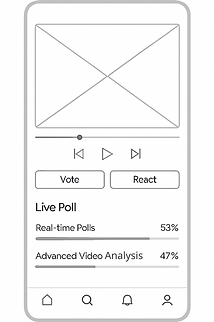
Minimal Playback Controls: play, pause, skip, and volume icons beneath the video frame
Interactive Buttons: Vote and React placed directly below the player for quick engagement
Real-Time Interaction Panel: live poll results displayed as horizontal bars with percentages
Top Section: AI Tools
-
Auto-captioning
-
Thumbnai Generator
-
Performance Analytics -Each tool is represented by a simple button with rounded corners and centered placeholder text — perfect for quick access.
Middle Section: Video Projects
Each project includes:
-
A thumbnail placeholder (marked with an “X”)
-
A title label (e.g., Video title)
-
Action buttons: Edit, Export, and Analyze — neatly aligned to the right
Watch Time: A jagged line chart showing peaks and valleys across a timeline — perfect for spotting drop-off points or binge moments
Engagement Rate: A bar chart with placeholder percentages (e.g., 50%, 75%, 60%) to visualize how viewers interact with content
Viewer Retention: A downward-sloping line chart that tracks how long users stay engaged — ideal for optimizing pacing and structure
Video Player Area: Dominates the screen with a clean placeholder frame and minimal playback controls (rewind, play/pause, volume)
Reaction Buttons: Like, Love, and Vote — placed unobtrusively below the video for quick engagement
Retractable Side Panel: Titled Live Poll, it includes:
-
A placeholder poll question
-
Two stacked options (Option 1, Option 2) in rounded buttons
-
Minimal text and clean spacing for real-time interaction data
2. User Flows

Entry point for personalized discovery
Wireframe shows 2×2 grid layout with tag overlays
CTA buttons: Like, Love
Central play area with minimal playback controlsProgress bar and quick reactions: Like, Vote
Subtle overlay with Like, Love, Vote buttonsSide panel shows real-time poll question and options
Horizontal list layout for continuous viewingBased on mood, behavior, and social signals

Creator Dashboard
Shows tools and project list
UI hints: buttons for Edit, Export, and Analyze
Project thumbnails with action iconsTool shortcuts for quick access
Upload Screen
Uploads new video content
Large upload icon with Upload button
Simple drag-and-drop or file picker layout
AI Editing Tools
Applies auto-captioning, thumbnail generator, etc.
Tool buttons: Auto-captioning, Thumbnail Generator, Performance Enhancer
Lightbulb icon to suggest smart edits
Export and Analytics
Exports the video and views performance analytics
Export buttonGraphs: line chart for watch time, bar chart for engagement
Clean layout for creator insights
3. Design Rationale


4. High-Fidelity Mockups


Summary: By combining thorough user research with design iteration, I was able to create a refined user experience for VidAI that strikes the perfect balance between functionality and simplicity. Throughout the design process, I focused on ensuring the platform’s most powerful features—AI-driven content recommendations, real-time engagement, and creator tools—were intuitive and unobtrusive.
Every design decision, from mood-based tagging on the home screen to the seamless transition between the video player and the creator dashboard, was grounded in research insights. The result is a platform that offers robust capabilities while keeping the user interface minimal and approachable. VidAI isn't just about delivering cutting-edge AI features—it's about making them easy to use, ensuring that both creators and viewers can focus on what truly matters: engaging, personalized content.
Testing, Iterating, and Improving
The real magic happened when we started testing. We conducted A/B tests to validate key features, including the recommendation engine and real-time interaction features.
Here’s the most interesting part:
The version of the recommendation engine that used contextual signals—like time of day and mood—led to a 35% increase in user engagement compared to the baseline version.
Creators who tested the AI-powered editing tools saved an average of 25% more time on video production, thanks to features like auto-captioning and thumbnail generation.
Viewers who engaged with interactive polls and clickable video elements spent 45% more time on the platform.
These results were exciting, but we weren’t done yet. We took the feedback and iterated on the designs, simplifying some of the more complex features and refining the creator dashboard to make data more actionable.


The Final Product & Its Impact
When the platform launched, it felt like we had created something truly new—a video platform that combined intelligence with interaction, designed to meet the needs of both viewers and creators.
The feedback from users was overwhelmingly positive:
35% increase in user engagement thanks to personalized recommendations.
45% higher retention rate as viewers spent more time on the platform interacting with videos.
25% reduction in editing time for creators using AI tools.
The platform not only improved how people consumed and created content, but it also provided actionable insights to creators and marketers, changing the way they approached video production.
What’s Next for VidAI?
We’ve just scratched the surface. The next phase of VidAI will focus on taking personalization even further, using emotion-based recommendations to gauge user sentiment and tailor content based on their emotional state. We’re also exploring cross-platform integrations to make it easier for creators to publish videos directly to social media, without missing a beat.
Through the iterative process of user research, design, testing, and feedback, VidAI has evolved into a product that is smarter, more intuitive, and more engaging—all thanks to a deep understanding of user needs and a commitment to pushing the boundaries of what’s possible.
Final Thoughts
What started as a project to improve video discovery has turned into something much more—an intelligent, interactive platform that empowers both creators and viewers. It’s a reminder of the importance of user-centric design and the transformative power of AI when used responsibly and thoughtfully.