

UX & Research Case Study: Remote Card Sorting Tool for Information Architecture

Context
Situation:
As a UX Research Manager, I was facing a high demand for card sorting activities within my team, specifically for refining Information Architecture (IA). Our company was running multiple IA studies concurrently, and the need to quickly process and analyze remote card sorting data was growing. At the same time, I wanted to reduce costs and protect internal data by not relying on third-party card sorting tools.
Our challenge was to create a tool that would allow us to:
-
Conduct remote card sorting activities with internal users.
-
Automate data analysis to speed up insights and reporting.
-
Eliminate the need for costly external tool subscriptions (e.g., OptimalSort, UsabilityHub), especially as those tools often involved sharing our proprietary data.
Thus, I took on the responsibility of leading the design and development of an internal card sorting tool that would be flexible enough to meet the needs of our IA work while ensuring data privacy and cost efficiency.
Objective
My primary goals were:
-
Design a tool for remote card sorting that supports open, closed, and hybrid methodologies, enabling our internal teams to run user research studies from anywhere.
-
Automate data analysis to speed up insights extraction, such as grouping, clustering, and categorizing data, which would otherwise take a significant amount of manual effort.
-
Keep the tool and data internal: Since our company deals with sensitive information, the tool had to be hosted internally to ensure data privacy and security.
-
Reduce costs by eliminating the need for third-party tools and instead building a custom solution that was scalable and integrated well with our other internal systems.
Research Process
1. Understanding the Problem
Situation:
We were experiencing high demand for remote card sorting activities, but existing tools either did not meet our privacy requirements or were too costly for repeated use. My role was to ensure the tool was built with a focus on the needs of the IA team and the UX research group, while addressing both operational and technical challenges.

Action:
I interviewed the UX researchers, information architects, and product teams within the company to gather detailed requirements and pain points.We identified the following challenges:Manual Analysis: After conducting a card sorting study, the analysis was slow and resource-heavy, often requiring researchers to manually group data or search for patterns.Data Sharing Concerns: We wanted to ensure confidentiality by keeping all research data internal.Lack of Collaboration: We needed a tool that would allow real-time collaboration between remote researchers and participants, as our teams were distributed.
We created user personas based on our research. These personas included:


Insights:Users wanted a simple, intuitive interface to create and manage remote studies.The analysis capabilities were essential—automated features to group and organize data, along with visualizations that would save time.Data security was the top concern, with internal hosting being a must.

2. Ideation & Feature Definition
Situation:
We now had a clear understanding of the user needs, so we could start defining the tool's features. The tool needed to be flexible, scalable, and easy to use for both novice and advanced users.
Action:
I brainstormed with the team to prioritize essential features for the tool:
Remote card sorting: Participants should be able to engage in card sorting activities online with easy navigation.
Automated data analysis: Instead of manually reviewing and categorizing every card sorting session, we focused on automating clustering and categorizing results, providing actionable insights quickly.
Real-time collaboration: Multiple users should be able to interact with and analyze data during the card sorting process.Secure data storage: The tool would be hosted internally to ensure the safety of sensitive research data.
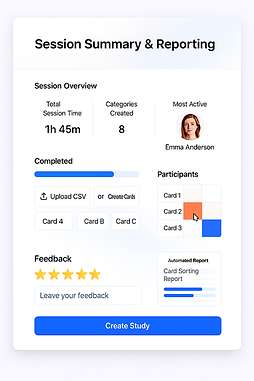
Export options: Researchers needed the ability to quickly export reports and data visualizations for internal presentations.


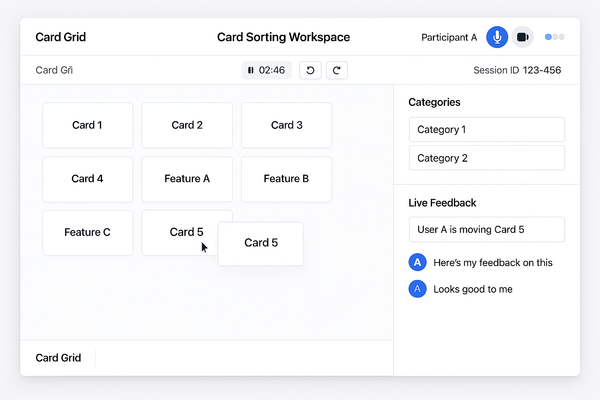
Prototypes:We developed interactive wireframes for the core features, including the card sorting interface, real-time dashboards, and the data analysis screen.
Insight: The collaborative aspect was a top priority, as remote teams needed to see changes as they occurred. The data visualization aspect also emerged as critical, so teams could quickly interpret patterns and insights.
3. Development & Testing
Situation:
Once the features were clearly defined, we moved to the development and testing phase. Since we were building this tool internally, our resources were limited, so we had to ensure that the tool would be robust and scalable while also keeping it cost-effective.
Action:
-
We began by developing the core features:
-
Card Sorting Setup: Researchers could create a new card sorting session, upload cards, and define the sorting task.
-
Remote Participation: Participants could access the session remotely, with a clean, easy-to-use interface to drag and drop cards into categories.
-
Real-Time Collaboration: Team members could join the session and observe participants’ progress, providing immediate feedback.
-
Automated Analysis: We built algorithms to automatically detect common patterns in card placements (e.g., clustering, heatmaps), helping to quickly identify how participants grouped information.
-
Data Export: After each session, the data was available for export into CSV or PDF formats for reporting.
-
-
Internal Testing: I conducted internal usability testing with our team to make sure the tool met our needs. Key feedback included:
-
The automated analysis was extremely helpful in reducing time spent analyzing data manually.
-
The real-time collaboration feature allowed us to provide immediate feedback to participants, improving engagement.
-
The tool’s simplicity made it easy for non-technical users to run studies and interpret results.
-
Result: After two rounds of testing, we had a high-fidelity prototype that satisfied both technical and user experience requirements, which was then passed off to engineering for implementation.




4. Finalization & Rollout
Situation:
After internal testing and validation, the tool was ready for internal rollout. However, we needed to ensure it was scalable and easy to maintain.
Action:
-
We conducted a final round of user testing with a broader internal audience, including various teams (IA, UX, Product) to confirm the tool’s effectiveness.
-
Based on feedback, we made several UI improvements to make the interface even more intuitive.
-
We deployed the tool on an internal server, ensuring it was fully compliant with our company’s security protocols.
Result:
-
The tool was successfully rolled out to the UX Research team and the Information Architecture team, enabling them to run remote card sorting studies with minimal setup and much faster analysis.
-
Teams reported a 40% reduction in time spent analyzing card sorting results and a 30% improvement in collaboration efficiency.
-
Since the tool was hosted internally, all data remained secure, and we were able to save on external tool licensing costs.
Key Outcomes & Learnings
Outcome:
-
The internal card sorting tool became a valuable resource for all UX research teams, speeding up IA studies and improving collaboration.
-
We achieved cost savings by eliminating external tool subscriptions and ensured that our data privacy was never compromised.
Key Learnings:
-
Automation in Analysis: Automating data analysis was crucial in reducing the workload and ensuring quick access to insights.
-
Real-time Collaboration: Facilitating remote participation and allowing team members to collaborate during card sorting exercises was key to improving workflow.
-
Internal Data Security: Hosting the tool internally ensured that we retained full control over sensitive research data.